OGSolarStore
Single Cell Capacity Tester & Charger, 5V 40A - Zketech EBC-A40L
Single Cell Capacity Tester & Charger, 5V 40A - Zketech EBC-A40L
Available to order Ships in 4 weeks.
Couldn't load pickup availability
- ✓ Stocked in Michigan
- ✓ Sourced from Certified Manufacturer
Share
The ZKETECH EBC-A40L is a high-current single-cell tester: charger, programmable load and capacity meter in one bench unit, built for the large prismatic cells that modern packs are made from. It charges at up to 35 A and discharges at up to 40 A on a single cell up to 5 V, and measures real capacity in amp-hours and watt-hours while it works.
This is the tool for grading 100 Ah to 320 Ah LiFePO₄ cells before you build with them. At 5 A, a 280 Ah cell takes over two days to discharge. At 30 A it takes about nine hours, so you can run one cell per day and grade a full sixteen-cell set in a working fortnight instead of a season.
Key features
- 35 A charge and 40 A discharge on a single cell, inside a 180 W discharge envelope.
- Full current across the whole cell range. A 40 A discharge at 3.65 V is 146 W, inside the 180 W limit, so unlike lower-power testers the A40L never has to reduce current on a lithium cell.
- Built-in AC power supply. Plugs straight into the wall, no external brick to size or lose.
- CC-CV charging, and constant-current or constant-power discharge, with settable cutoff current, cutoff voltage and step timer.
- Unattended multi-step cycling through the free EB Tester PC software: build a charge, discharge and recharge sequence, save it as a profile, and reload it for the next cell.
- Four-wire measurement. Voltage and current run on separate channels, so lead resistance does not corrupt the reading. This matters far more at 40 A than it does at 5 A.
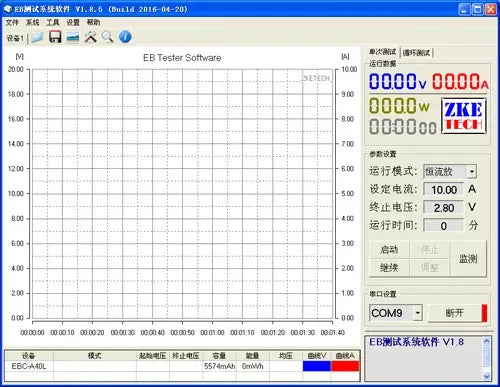
- Real graphing. The software plots voltage and current against time and reports measured capacity in Ah and Wh, so you can compare cells side by side.
- Standalone operation. Front-panel buttons and LCD work with no computer attached. The software adds graphing and multi-step profiles.
What you can test
The A40L is a single-cell instrument. Its range is 0–5 V, which covers every common lithium cell chemistry and nothing above one cell.
| Battery | Full-charge voltage | Suitable? |
|---|---|---|
| LiFePO₄ prismatic cell (1s), 100–320 Ah | 3.65 V | Yes, this is what it is for |
| Li-ion / NMC pouch or prismatic cell (1s) | 4.2 V | Yes |
| LTO cell (1s) | 2.8 V | Yes |
| Sodium-ion cell (1s) | 4.0 V | Yes |
| Cylindrical cells (18650, 21700, 32700) | 3.65–4.2 V | Yes, though 40 A is far more current than these need |
| Any 2s or larger pack, 12 V pack, 24 V pack | over 5 V | No. Use a pack-level tester instead |
Testing an assembled pack instead of loose cells? The A40L cannot do it. Look at the EBC-A20 for packs up to 30 V, or the EBC-B20H for 12–72 V packs.
About the 40 A rating and your test leads
Read this before you buy. The tester will deliver 40 A. The included leads are the limiting factor, not the electronics. Stock 10 AWG cable is good for roughly 30 A sustained before it heats, and hot leads add resistance that skews your measurement. Plan on 30 A for long runs, or fit heavier cable with ring terminals.
ZKETECH itself recommends testing lithium cells at around 0.2 C, which is 20 A on a 100 Ah cell and 56 A on a 280 Ah cell. In other words, on the large cells this tester is built for, you are not current-limited by the instrument at all. You are limited by cable, and by how long you want to wait.
Here is what that means in real time on the bench:
| Cell | at 20 A | at 30 A | at 40 A |
|---|---|---|---|
| 100 Ah LiFePO₄ | 5.0 h | 3.3 h | 2.5 h |
| 200 Ah LiFePO₄ | 10.0 h | 6.7 h | 5.0 h |
| 280 Ah LiFePO₄ | 14.0 h | 9.3 h | 7.0 h |
| 320 Ah LiFePO₄ | 16.0 h | 10.7 h | 8.0 h |
Those are discharge times only. A full charge, discharge and recharge cycle runs roughly two and a half times longer, which is why the unattended cycle function exists.
Worked example: grading a 280 Ah LiFePO₄ cell
This is the test most customers run first, on every cell in a new set, before any of them go into a pack. It fully charges the cell, measures true capacity on the way down, then leaves it at a safe storage state.
Open EB Tester, connect to the tester, click Cycle Test, then Setting (the button at the bottom right, not the Setting tab at the top). Add three steps:
| Step | Mode | Settings | What happens |
|---|---|---|---|
| 1 | C-CV (charge, constant voltage) | Current 30 A · Volt 3.65 V · Cutoff 2.8 A | Charges at 30 A until the cell reaches 3.65 V, then holds 3.65 V while current tapers. Ends at 0.01 C, which is a genuine full charge. |
| 2 | D-CC (discharge, constant current) | Current 30 A · Cutoff 2.50 V | Draws a steady 30 A until the cell falls to 2.5 V. This step produces your capacity figure in Ah and Wh. About 9 h on a healthy 280 Ah cell. |
| 3 | C-CV (charge, constant voltage) | Current 30 A · Volt 3.35 V · Cutoff 2.8 A | Recharges to roughly 50 % state of charge, the right place to leave a cell that is going on a shelf before assembly. |
Click Add after each step, then OK. Connect the cell, click Start, and the tester runs all three stages back to back, roughly 22 h end to end. Save the profile and reload it for the next cell so every cell in the set is graded on identical terms. That is the whole point: a comparison is only valid if the test is the same every time.
Compression matters. Most large prismatic cells, EVE cells in particular, specify a fixture pressure during cycling. Testing a bare unclamped cell at 30 A can read low and will swell the cell over repeated cycles. Test cells in the fixture, or at least clamped between two plates.
Reading your results
When the run finishes, the software shows the cycle as a graph: one trace for voltage, one for current, plotted against time. The D-CC step reports measured capacity in amp-hours alongside total watt-hours.
Three things to look at. First, the number against the rating: a new grade-A 280 Ah cell should measure at or above 280 Ah at a 0.1–0.2 C rate. Meaningfully under that is a grade-B cell, whatever the invoice said. Second, the spread across the set: sixteen cells within a couple of percent of each other build a pack that balances easily and stays balanced. One outlier drags the whole pack down to its own capacity. Third, the shape of the curve: LiFePO₄ holds a long flat plateau near 3.2 V and then falls off sharply. A cell that starts sagging early in the plateau has higher internal resistance than its siblings, and is a poor match for them even if the amp-hour number looks acceptable.
Technical specifications
| Parameter | Value |
|---|---|
| Model designation | EBC-A40L: 5 V / 40 A / 180 W |
| Power supply | AC mains, internal supply |
| Voltage range | 0.000–5.000 V, single cell only |
| Charge current | 0.10–35.00 A in 0.01 A steps |
| Discharge current | 0.10–40.00 A in 0.01 A steps |
| Maximum discharge power | 180 W |
| Charge mode | Constant current then constant voltage, stop on cutoff current, time or manual |
| Discharge mode | Constant current or constant power, stop on cutoff voltage, time or manual |
| Voltage accuracy | 0.2 % ±0.003 V |
| Current accuracy | 0.2 % ±0.01 A |
| Capacity resolution | Under 10 Ah: 0.001 Ah · 10–100 Ah: 0.01 Ah · Over 100 Ah: 0.1 Ah |
| Test timer | 0–999 minutes per step; set 0 for no time limit |
| Measurement | Four-wire, voltage and current channels separated, through two front-panel aviation sockets |
| Display | LCD showing mode, voltage, current, elapsed time, capacity and energy |
| PC connection | Dedicated USB-TTL cable, for graphing, calibration and firmware updates |
| Cooling | Forced air, thermostatic fan |
| Packed weight | 6.5 kg |
| Shipping box |
What’s in the box
- ZKETECH EBC-A40L battery tester
- AC power cord
- USB-TTL communication cable for PC connection
- Test leads with alligator clips
- Printed user manual, plus software download links
Connecting to your computer
The tester works fully standalone using its front-panel buttons. The software is what unlocks graphing and multi-step cycle programming, and on a tester that runs 9-hour discharges, the graph is most of the value.
- Install the USB-TTL driver, then install the EB Tester software. Download links for both are in the manual and at zketech.com.
- Windows in S Mode? You will need to leave it first, or Windows will block the install. Open the Microsoft Store, search “switch out of S mode”, and click Get. S Mode is often preset on budget laptops.
- Power on the tester and connect the included USB adapter between the tester and your PC.
- Open EB Tester and find Comm Setting. Choose your COM port and click Connect. It is usually a number between COM3 and COM9. If no port appears, the driver has not installed correctly.
- Once connected, the Cycle Test tab appears at the top right. That is where you build multi-step test profiles.
Windows only. ZKETECH has confirmed the EB Tester software does not currently run on macOS. Mac users can still operate the tester manually from its front panel, but cannot graph or program cycle tests.
Typical applications
- Grading new grade-A and grade-B prismatic cells on arrival, before they go into a pack
- Matching a set of 4, 8 or 16 cells so the pack is built from consistent capacity
- Verifying a supplier’s stated capacity, with a curve you can attach to a claim
- Capacity-testing salvaged or second-life cells to decide what they are worth
- Repeatable cycle-life testing at realistic C-rates
- Recovering and re-testing a cell that came out of balance in an existing pack
Safety and usage notes
- Single cells only, 5 V maximum. Connecting a 12 V pack will damage the tester.
- Never reverse polarity. Check your clip connections before starting a test.
- Watch your leads. Stock 10 AWG cable is good for about 30 A sustained. Heavier cable with ring terminals is the single best upgrade you can make to this instrument.
- Get a solid connection. Alligator clips on a bare terminal are the most common source of a bad reading at high current. Bolt to the terminal where you can.
- Test cells under compression where the manufacturer specifies it, and keep cells near 25 °C for comparable results.
- Keep the vents clear. The unit dissipates up to 180 W as heat and the fan needs airflow around the case.
- Use the supplied USB-TTL cable. An ordinary USB cable will not communicate; the supplied cable contains a serial converter.
- Allow a rest period between discharge and recharge in auto cycling so the cell can settle.
Frequently asked questions
Can it test a 12 V battery?
No. The A40L is a single-cell instrument with a 5 V ceiling. For 12 V and 24 V packs look at the EBC-A20; for 12–72 V packs, the EBC-B20H.
Will it really discharge at 40 A?
Yes, on discharge. Unlike lower-power testers, the A40L does not derate on a lithium cell: 40 A at 3.65 V is 146 W, inside its 180 W envelope. Charging is capped slightly lower, at 35 A. The practical limit is your cable. Stock 10 AWG leads are good for around 30 A sustained.
How long does a 280 Ah cell take?
About 9 h to discharge at 30 A, or roughly 22 h for a full charge, discharge and recharge cycle. Set the step timer to 0 so nothing cuts the run short.
Does it work on a Mac?
Not for the software. ZKETECH has confirmed EB Tester is Windows only. Manual front-panel operation works regardless.
Do I need a computer to use it?
No. Modes, currents and cutoffs are all settable from the front panel and results show on the LCD. The software adds graphing and multi-step profiles.
Can I test two cells in parallel?
Yes, if they are already at the same voltage. The tester reads them as one cell, so you get a combined capacity, not individual numbers. For grading, test cells one at a time.
A20 or A40L?
The A20 is an 85 W tester that covers packs up to 30 V but slows to a crawl on large cells. The A40L is 200 W and single-cell only. If you build with 100 Ah or larger prismatics, you want the A40L. Many builders own both.
Downloads and support
User manual: Download the official EBC-A40L user manual (PDF)
Software: The EB Tester software and USB-TTL driver are free downloads from zketech.com, with links provided in the manual.
System requirements: Windows 7, 8, 10 or 11 with a free USB port and administrator rights to install the driver. Not compatible with macOS.